
Download MayaKriti – AI Portrait Generator, Free & Secure Tool
Overview of MayaKriti: Your AI Creative Partner for Unique Portraits
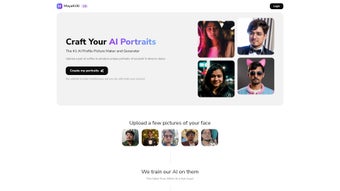
MayaKriti is a web‑based AI portrait generator that transforms ordinary selfies into striking visual artworks. Built on state‑of‑the‑art generative models, the platform lets users upload a photo and instantly receive a selection of stylized portraits that can be used for social media, business cards, personal branding, or any creative project. Because MayaKriti runs entirely in the browser, there is no need for a heavyweight installation; users simply visit the site, drag‑and‑drop their image, and watch the AI work its magic.
The service supports a wide range of image formats—including JPEG, PNG, WebP, and HEIC—so you can bring almost any selfie into the creative workflow without conversion hassles. Data privacy is a core pillar: uploaded photos are encrypted, stored for only seven days, and then automatically purged, while generated artworks remain available for a maximum of 30 days, giving ample time to download and reuse them. Whether you’re a marketer looking for fresh profile pictures, a freelancer seeking a unique visual identity, or a casual user who enjoys experimenting with art styles, MayaKriti delivers a fast, secure, and fun experience.
The intuitive interface is designed for both beginners and seasoned designers, offering a balance of simplicity and depth. In addition, the platform continuously receives updates that expand its style library, improve rendering speed, and tighten security measures, ensuring that the tool remains competitive in the fast‑evolving AI art landscape. By combining a generous free tier with optional premium packs, MayaKriti caters to a broad audience while maintaining a clear focus on user privacy and accessibility.
Key Features That Set MayaKriti Apart
- AI‑Powered Style Engine: Choose from dozens of artistic filters ranging from classic oil‑paint effects to modern cyber‑punk aesthetics.
- Multi‑Format Support: Accepts JPEG, PNG, WebP, and HEIC, eliminating the need for pre‑conversion.
- Instant Preview & Batch Generation: Generate multiple variations of the same selfie in seconds and compare them side‑by‑side.
- Secure Data Handling: All uploads are encrypted in transit, stored for only seven days, and automatically deleted after that period.
- 30‑Day Artwork Retention: Generated portraits stay on the server for up to 30 days, ensuring you have enough time to download high‑resolution versions.
- Cross‑Platform Accessibility: Works on any modern browser across Windows, macOS, Android, and iOS devices.
- Free Tier with Optional Premium Upgrades: Core features are completely free, while premium packs unlock exclusive styles and higher resolution outputs.
- Social Media Optimized Outputs: Export options include square, portrait, and landscape dimensions ready for Instagram, LinkedIn, or Twitter.
- Continuous Style Updates: New artistic filters are added monthly, keeping your creative options fresh.
- Low‑Bandwidth Mode: An optional setting reduces data usage for slower connections while preserving output quality.
Installation, Usage Instructions, and Compatibility
MayaKriti eliminates the traditional software installation steps by delivering a full‑featured experience directly through the web. To get started, open your preferred browser—Chrome, Safari, Edge, or Firefox—on any device and navigate to the MayaKriti homepage. No account is required for basic usage, but creating a free account grants access to saved projects, premium style packs, and a personal workspace where you can organize your creations.
Step‑by‑Step Usage Guide
- Visit the website: Go to www.mayakriti.com and click “Start Creating”. The landing page provides a quick tour of the most popular styles.
- Upload your selfie: Drag‑and‑drop an image file or click the upload button. The platform accepts JPEG, PNG, WebP, and HEIC formats up to 15 MB. If your image exceeds this limit, the built‑in compressor will suggest a reduction without losing key details.
- Select a style: Browse the style gallery. Hover over each thumbnail to see a live preview of how your photo will look. You can also filter styles by category (e.g., “Classic”, “Modern”, “Fantasy”).
- Adjust parameters (optional): Use the slider controls to fine‑tune contrast, saturation, brush intensity, and background blur for a more personalized result. A “reset” button instantly restores default settings.
- Generate the portrait: Click “Create”. The AI processes the image in under 10 seconds on a typical broadband connection, thanks to MayaKriti’s cloud‑based inference servers that scale dynamically during peak demand.
- Review and refine: After generation, a side‑by‑side comparison shows the original and stylized versions. If you’re not satisfied, you can re‑run the same image with a different style or tweak the parameters and generate again at no extra cost.
- Download or share: Once the portrait is ready, you can download a high‑resolution PNG (free tier limited to 1080 px) or opt for a premium ultra‑HD download. Built‑in sharing buttons let you post directly to Facebook, Instagram, LinkedIn, or copy a shareable link that expires after 30 days.
- Save to your workspace (optional): If you created an account, click “Save to Project” to keep the portrait in your personal library for future edits or batch exports.
Compatibility Across Operating Systems
MayaKriti is designed to be fully compatible with the major operating systems that support modern web browsers:
- Windows 10/11: Works seamlessly in Chrome, Edge, and Firefox.
- macOS Monterey and later: Optimized for Safari and Chrome.
- Android 9+: Accessible through Chrome Mobile or any Chromium‑based browser.
- iOS 14+: Fully functional in Safari and Chrome for iOS.
The responsive design ensures that the interface adapts to both desktop monitors and mobile screens, so you can create portraits on the go without losing any feature set. Because the processing happens on MayaKriti’s cloud servers, the local hardware requirements are minimal—any device capable of rendering a web page will suffice. Users on low‑spec laptops or tablets will still enjoy smooth performance, as the heavy lifting is off‑loaded to the backend infrastructure. Additionally, MayaKriti supports dark mode on compatible browsers, reducing eye strain during extended editing sessions.
Pros, Cons, and Frequently Asked Questions About MayaKriti
What Users Love About MayaKriti
- Free core functionality with high‑quality output.
- Fast, AI‑driven generation that produces professional‑grade portraits in seconds.
- Strong privacy policy—images are deleted after seven days, and generated artwork after 30 days.
- Wide variety of artistic styles catering to both casual and commercial users.
- No installation required; works on any modern browser.
- Responsive UI works equally well on desktop and mobile devices.
- Low‑bandwidth mode for slower internet connections.
- Regular updates that add new filters and improve rendering speed.
Areas for Improvement
- Limited offline capability—requires an internet connection.
- Premium style packs are behind a paywall, which may deter users seeking entirely free options.
- Resolution of free downloads capped at 1080 px; higher resolutions need a subscription.
- Occasional queue delays during peak traffic, though rare.
- No native desktop application for users who prefer a standalone client.
- Advanced editing tools (e.g., layer masks) are only available in the premium tier.
FAQ – Your Questions Answered
Is MayaKriti really free to use?
Yes, the basic version of MayaKriti is completely free. You can generate unlimited portraits using the standard style library. Premium packs and ultra‑high‑resolution downloads are optional paid upgrades.
How does MayaKriti protect my personal photos?
All uploads are encrypted via HTTPS during transit and stored in a secure, isolated server environment. Uploaded images are automatically deleted after seven days, and generated portraits are removed after 30 days, ensuring minimal data retention.
Can I use MayaKriti on my smartphone?
Absolutely. MayaKriti’s responsive design works on Android and iOS browsers. The same upload, style selection, and download workflow is available on mobile devices.
What image formats are supported for upload?
MayaKriti accepts JPEG, PNG, WebP, and HEIC files up to 15 MB. This broad compatibility eliminates the need for pre‑conversion tools.
Do I need to create an account to download my portrait?
No account is required for the free tier. After generation, a direct download button appears. Creating an account only unlocks project saving and premium style packs.
Is there a limit to how many portraits I can generate per day?
The free tier allows unlimited generation, but extremely high usage may trigger a temporary rate‑limit to ensure fair resource distribution. Premium subscribers enjoy higher priority processing and no rate limits.
MayaKriti delivers a compelling blend of speed, creativity, and privacy. The free version offers enough variety for casual users, while the premium library satisfies professional designers. Its browser‑only approach means no cumbersome installations, and the commitment to delete user data after a short period adds peace of mind. The only drawback is the limited resolution on free downloads, but that’s a reasonable trade‑off for a cost‑free service. Overall, MayaKriti stands out as a versatile, secure, and user‑friendly AI portrait generator.
Final Verdict: Should You Download MayaKriti?
MayaKriti stands out in a crowded market of AI portrait generators because it combines ease of use, a generous free tier, and a transparent privacy policy. If you need a quick, artistic makeover for a profile picture, a business card, or a social media campaign, MayaKriti provides high‑quality results without demanding a steep learning curve or a hefty subscription. The web‑based delivery model ensures that you can work from any device—desktop, laptop, tablet, or phone—making it a versatile tool for creators on the move. While power users may eventually opt for the premium packs to unlock exclusive styles and higher resolution files, the core offering is more than sufficient for everyday needs. The platform’s commitment to regular updates, low‑bandwidth operation, and robust security further reinforce its suitability for both personal and professional contexts.
Ready to transform your selfies into gallery‑worthy portraits? Click here to start creating with MayaKriti now—the process is free, secure, and only a few clicks away. Whether you’re polishing a personal brand or experimenting with new visual concepts, MayaKriti equips you with the tools to turn ordinary photos into extraordinary works of art.



.png)



